


Hair App-AI Hairstyle Try on
2.4398.00 Reviews
App Specs
- Version
- 12.4.7
- Updated On
- License
- Free
- Downloads
- 5,000,000+
- Developer
- SmallUniverse Apps
- Categories
- Beauty
- Platform
- Android
Screenshots
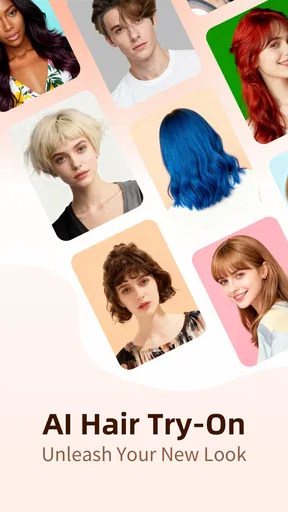
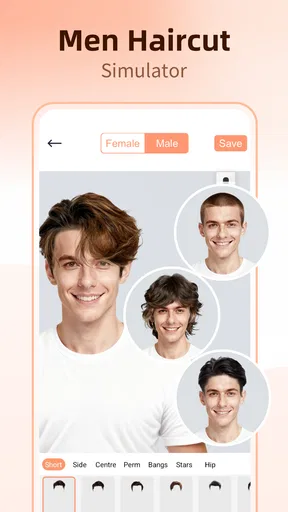
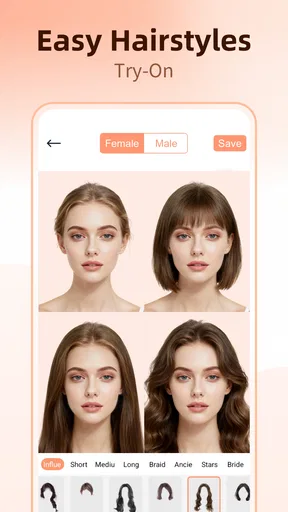
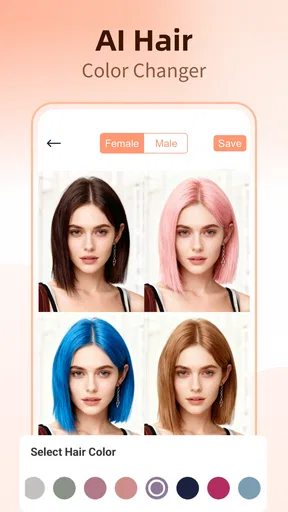
 Analysis by AppCompare
I treat a hairstyle preview as a way to ask better questions, not as a promise of exactly what I’ll see in the mirror after a salon visit. That distinction matters with Hair App-AI Hairstyle Try on: it can make experimenting feel easy, but the result is most useful when I approach it as inspiration rather than a final decision.
The first-week appeal: quick experiments without scissors
When I first try a hair makeover app, I want to get to the interesting part quickly. This one is built around a straightforward selfie-to-preview routine, so I can move from curiosity to seeing a different look without learning a complicated editor. For a first session, that low barrier is its strongest draw: I can compare a familiar shape with a more dramatic change before making any real commitment.
A practical way to use it is to change one thing at a time. I would first compare lengths or shapes while keeping color ideas for a separate pass. That makes it easier to tell whether I’m responding to the cut itself or to the novelty of a striking shade. It also gives me more useful images to show a stylist than a camera roll full of unrelated experiments.
Photo choice has a real effect on how helpful the preview feels. I’d start with a clear, front-facing selfie in even light, with my face unobstructed and my head held naturally. If a result looks oddly placed, I would try another photo before deciding the style looks wrong. A virtual preview can only work with the image it has, so a better starting point is often more useful than repeatedly tapping through options.
What to bring from a screen to a salon
The app is most valuable as a conversation starter. A saved preview can show a stylist the general direction I have in mind, but I would explain what I like about it too: perhaps the length around the face, the overall volume, or the color family. Those details help separate the part I actually want from the parts that may be an artifact of the edit.
I would also bring more than one example if I were seriously considering a change. One image can make a look seem like an all-or-nothing choice; a small set of previews can communicate a range, from a cautious adjustment to a bolder possibility. A stylist can then advise on what suits my current hair and what would take extra work to achieve. The app helps me arrive with a visual idea, not with a demand that a real haircut match a digital overlay pixel for pixel.
Who gets the most from trying it
I can see this being especially useful for someone who is curious about a noticeable change but tends to hesitate at the appointment. It gives that person a private place to explore options and decide what feels appealing before explaining it to another person. It also works as a light, social experiment: trying a few looks, saving a favorite, and asking a trusted friend for an honest reaction can be fun even when no salon visit is planned.
Worth Reading Before You Choose

Flipboard Shows What News Apps Must Do Beyond the Feed

Switching to Android Auto Means Rethinking Your Driving Routine

Google Calendar Makes a Crowded Week Easier to Manage

Ludo King Makes the Most of the Minutes Between Plans

Baby Panda World Brings Quick Play to Modern Phones, but Its Game Library Feels Busy

ESPN’s Live Game View Makes Following Close Games Easier
It is less useful if I already know exactly what I want and mainly need technical advice about maintenance, hair texture, or the steps needed to reach a particular color. A preview cannot replace a stylist’s assessment of my actual hair. I would also skip relying on it for a high-stakes decision if I find that image-based previews make me more uncertain rather than more confident. In that situation, reference photos of real cuts and a direct consultation are likely to be a better route.
A realistic everyday decision
Imagine I have a salon appointment coming up and keep switching between keeping my length and trying a shorter shape. I can take a clear selfie, compare a few options, then save the versions that feel closest to what I might actually wear. Instead of arriving with only a vague request to “do something different,” I can show the stylist the silhouette I’m considering and ask what would work with my hair as it is now.
The useful part of that routine is not that the app makes the decision for me. It helps me notice what I consistently prefer across several previews. If I keep choosing a similar length or shape, that pattern is a better clue than one dramatic image that looked exciting for a moment. I would still leave room for the stylist to adjust the plan based on what is practical.
How it compares with familiar alternatives
Compared with manually editing a photo, a dedicated hairstyle preview is a faster way to focus on hair rather than learning a general-purpose image editor. Compared with browsing salon inspiration photos, it makes the idea feel more personal because I can see a style placed against my own face. Neither alternative is obsolete: real reference photos show how a cut looks on actual people, while a stylist can discuss the details that a simulated image cannot settle.
That makes this app a middle step rather than a replacement for either option. I would use it to narrow down possibilities, then look at real examples and ask a professional about feasibility. If I want precise color planning, detailed haircut guidance, or a dependable prediction of the finished salon result, those other sources are more important than a virtual try-on.
What’s the Buzz About?
Hair App-AI Hairstyle Try on is like having a virtual hairstylist at your fingertips. The app lets you try on a plethora of hairstyles without the commitment. The magic lies in its AI technology, which analyzes your facial features and suggests styles that might suit you. And trust me, the accuracy is impressive.
User-Friendly Interface
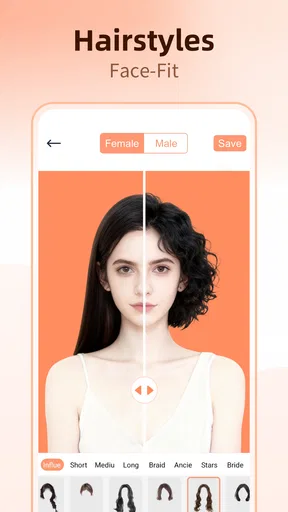
The first thing I noticed was how intuitive the interface is. No need to have a tech degree to navigate this one. From the moment you open the app, you're guided through a simple process. Just upload a selfie, and the app does its thing. The layout is clean, with easy-to-find options and no clutter. It's like the app knows you're here for the hair, not to figure out how to use it.
A Style for Every Mood
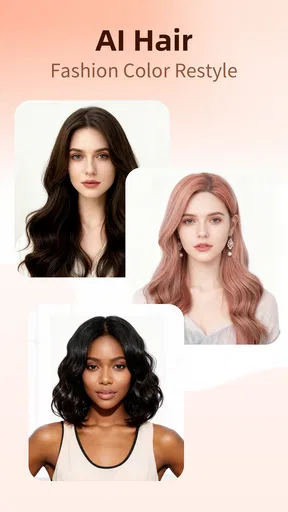
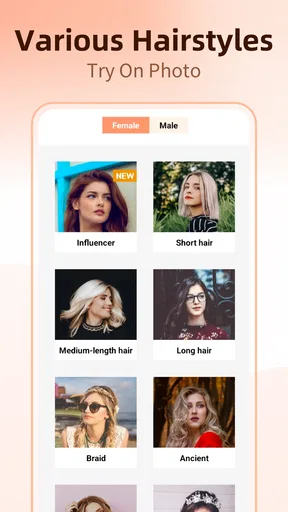
Whether you're feeling edgy or elegant, Hair App-AI Hairstyle Try on has got you covered. The app boasts a wide range of styles from chic bobs to glamorous waves, and even some wild color options for the adventurous. Want to see how you'd look with a pixie cut? Or maybe those rainbow highlights? It's all just a tap away.
That variety is useful for trying a direction I might not search for on my own, but I wouldn’t treat every option as an equally practical suggestion. A dramatic color can be entertaining to preview while requiring a much bigger real-world commitment than a small change in shape. I find it helpful to sort results mentally into “just for fun,” “worth discussing,” and “close to what I’d actually choose.” That simple filter keeps a playful session from turning into an unrealistic salon brief.
Realistic Results
This is where the app truly shines. The AI does a remarkable job of blending the hairstyle with your actual hair, making it look surprisingly realistic. It's not perfect, but the app does provide a pretty good idea of how you'd look with a new 'do. The best part? You can save these images and share them with friends. Cue the endless "Should I do it?" messages.
I’d be cautious about judging small details such as how a fringe sits, how the ends move, or whether a color would suit my natural base. A still preview cannot show how a cut behaves when I turn my head or how much styling it needs each morning. For a useful comparison, I would keep the same selfie while testing several looks; changing both the photo and the hairstyle at once makes it harder to tell what is causing a difference.
Making Decisions Easier
Ever walked into a salon and froze because you couldn't decide on a style? This app is like your cheat sheet. Having a visual reference can really help when consulting with your hairstylist. Plus, it's a fun way to experiment with styles you might not have considered before.
One question I’d ask myself before saving a preview is whether I would still like the look on an ordinary day, not only in a polished image. Would I be comfortable styling it before work? Does the change fit the amount of upkeep I want? The app can help me explore appearance, but those practical questions decide whether a look fits my routine. Thinking them through before an appointment can prevent an exciting preview from becoming a cut I don’t enjoy maintaining.
How It Stacks Up
In a world of hairstyle apps, this one holds its ground pretty well. The AI technology is advanced, and the style variety is more than adequate. While it might not replace the advice of a professional stylist, it's a fantastic tool for exploration. The app is free to download with optional in-app purchases, which is a nice touch for those who want to try before buying into premium features.
SmallUniverse Apps is the developer behind this free beauty app. It is rated for Everyone, and its listed minimum operating-system requirement is version 8.0. The current release is 12.4.7; the app first appeared on October 17, 2017. Its average rating is 2.4 from around 11,000 ratings, alongside about 398 written reviews, while installs have passed 5 million. I read that mixed public response as a reason to keep expectations measured: it has clearly reached many people, but popularity alone does not guarantee a smooth experience for every user.
There are optional in-app purchases, with listed items ranging from $0.99 to $39.99. I would spend time with the free version before paying, and check what an individual purchase unlocks in the app before confirming it. That is especially sensible for a tool I might use only when considering a new look. If I expect to revisit it often, a paid option may feel more worthwhile; if I only want one quick preview, I would avoid buying on impulse.
Month-to-month value and the upkeep question
The app’s lasting value depends less on how many looks I can tap through in one sitting and more on whether it helps with real decisions. Hair changes are occasional for most people, so this is not necessarily something I would open every day. It earns a place on my phone when I’m planning a cut, reconsidering my color, or collecting ideas before talking with a stylist. Between those moments, its usefulness may naturally fade.
That rhythm is not a flaw, but it does shape how I’d judge a purchase. I would not pay simply because I enjoyed the first burst of experimentation. I’d first see whether the free experience gives me enough options to make a shortlist and whether I return when an actual hair decision comes up. A beauty app can be entertaining for an evening and still not become a lasting habit; here, the strongest recurring reason to keep it is practical planning.
Maintenance burden and sources of fatigue
The main effort is choosing a photo that gives the preview a fair chance and then sorting through results without mistaking novelty for a good fit. If I use a blurry, poorly lit, or awkwardly angled image, the output may be less convincing, and repeating the process can become frustrating. A clean starting photo and a focused question—such as whether I prefer a shorter outline—make a session more efficient than testing every possibility at once.
Another source of fatigue is the gap between a fun digital transformation and the cost of maintaining its real-life equivalent. A vivid color or a sharply different cut may look appealing in a preview while asking for regular styling or salon upkeep. The app cannot decide whether I’m willing to manage that commitment. I’d use it to spot looks I like, then think about time, routine, and the advice of a stylist before acting.
The range of looks can also lose its charm if I keep scrolling without a goal. I get more out of a short, deliberate session than an endless hunt for a perfect image. Saving only a few strong candidates gives me something to compare later; keeping every experiment makes it harder to remember what actually appealed to me.
Room for Improvement?
No app is perfect, and this one is no exception. Occasionally, the AI might not perfectly align the hairstyle, especially if the uploaded photo isn’t well-lit or clear. Also, while there's a good range of styles, adding more updates with trending hairstyles could keep users engaged.
For me, that means treating a strange edge or an awkward fit as a limitation of the preview rather than proof that a real hairstyle would look bad. I would try one better-lit selfie, but I would not keep retaking photos indefinitely to force a result. If the same style continues to look unconvincing, I’d move to real reference pictures or ask a stylist instead. Knowing when to stop is part of getting value from the tool.
Does it earn a lasting place?
All in all, Hair App-AI Hairstyle Try on is a delightful app that combines fun with functionality. It’s perfect for anyone looking to shake things up without the fear of commitment. So next time you feel like trying something new, give this app a spin before heading to the salon. Who knows, you might just discover your next favorite hairstyle!
My longer-term verdict is a little more measured: I’d keep it available for the moments when I’m considering a change, rather than expecting it to become part of my daily routine. It suits curious people who want a quick visual starting point and are comfortable treating the result as an approximation. If I needed reliable technical advice, detailed upkeep guidance, or a highly accurate preview before a major transformation, I’d choose a stylist consultation and real-world references first. Used with that boundary in mind, it can make the early decision less intimidating without pretending to make the decision for me.
Pros
- Realistic hairstyle simulations.
- Wide variety of styles available.
- Easy-to-use interface.
- Quick style changes.
- No in-app purchases required.
Cons
- Limited ethnic hair options.
- Occasional app crashes.
- Requires good lighting for best results.
- High data usage during operation.
- No offline mode available.
FAQs for Hair App-AI Hairstyle Try on
What features does the Hair App-AI Hairstyle Try on offer?
The Hair App-AI Hairstyle Try on provides a range of features designed to help users experiment with different hairstyles virtually. It uses advanced AI technology to simulate how various styles, lengths, and colors would look on you. Users can upload their photos and try out the latest trends without any commitment. It also offers tutorials and tips for styling and hair care.
Is the Hair App compatible with all devices?
The Hair App is available for both Android and iOS devices, supporting the latest operating systems. However, it’s always recommended to check the app store for specific device compatibility and system requirements. The app may perform optimally on newer models with advanced processing capabilities, ensuring a smoother experience.
How accurate are the hairstyle simulations in the Hair App?
The app uses sophisticated AI algorithms to provide realistic hairstyle simulations. While it strives for accuracy, the result may vary based on the quality of the uploaded photo and lighting conditions. Users should consider the simulations as a guide rather than an exact representation and may want to consult with a professional hairstylist for final decisions.
Does the Hair App provide hairstyle recommendations?
Yes, the app provides personalized recommendations based on your face shape, hair type, and personal preferences. By analyzing your features, it suggests styles that are likely to suit you best. This feature helps users explore options they might not have considered, making the app a valuable tool for discovering new looks.
Is there a cost associated with using the Hair App-AI Hairstyle Try on?
The app is free to download, offering a range of features at no cost. However, it may include in-app purchases for premium features or ad-free experiences. Users can choose to upgrade for additional benefits, such as exclusive styles or personalized consultations. Details of these options can be found in the app’s store listing.


